
New customers
Renting a unit
How do I rent a unit?
Three ways to get started:
- Request a space online — fastest way to reserve
- Call or text us at (530) 966-0437, or email b.s.parkandstorage@gmail.com
- Make an appointment to come see the facility in person
What should I expect when I rent online?
When you submit a request online, we'll do our best to respond within the hour during business hours (8 AM to 5 PM), or by the next business day outside those hours.
You'll receive a lease and a link to your customer portal. Sign the lease and pay your first month's rent to lock in your space. Once we receive your signed lease, we'll send a Welcome Letter with your gate code and the location of your unit key.
Choosing a size
What unit size do I need?
Small units (fits a 1-2 bedroom apartment)
- 7' × 16' — about two rooms
- 10' × 10' — about three rooms
Large units (fits a 2 bedroom house or larger)
- 10' × 15' — about four rooms
Outside parking
- 30' — most cars, RVs & boats
- 45' — oversized vehicles, or more than one vehicle (stacked if they fit within the length)
Our units have 8-foot ceilings so you can stack boxes and furniture to make the most of the space. We recommend storing your belongings in totes and on pallets.
Move-in day
How do I use the gate?
Enter your five-digit code, then press the button with the key symbol on it. The gate operates from 6 AM to 9 PM daily.
- Licensed contractors can request 24-hour access.
- Boat and RV owners can request extended hours on a case-by-case basis.
- Some exceptions can be made when prior arrangements have been made with us.
The * and # keys don't open the gate — they call the owner. Use the phone button if you've forgotten your code, need assistance, or have locked yourself inside. If there's no answer, call the Sheriff's Office as a last resort — they can let you out.
You'll also need to enter your code on the inside keypad to exit.
How do I retrieve my key?
At the north end of Building B you'll find a set of lockboxes. Locate your lockbox number and combination on your Welcome Letter, retrieve your key, then close the box and spin the combination back to all zeros. Keep your key on you — don't put it back in the lockbox.
How do I get into my unit?
Your unit number is on your Welcome Letter. Park close to your building so others can drive past.
Garage-style doors: insert the key and turn, then remove the entire lock from the door. The key won't come out while unlocked. Slide the latch open and lift the door — it's handicap-rated and may not stay open on its own, so we recommend propping it with a stick or board. When you're done, close the door, slide the latch, and reinsert and turn the lock; the key comes back out once it's locked properly.
Swing doors: insert the key and turn — it stays in the lock while unlocked. Lift the latch to free the handle and pull the door toward you. When finished, push the door closed, reset the handle, confirm it caught top and bottom, then close the latch and lock. The key comes out once it's locked correctly.
Existing customers
Facility & access
Where is B.S. Park and Storage?
6291 County Rd 12, Orland, CA 95963. Please use Google Maps — Apple Maps is unreliable and will take you to the wrong side of town.
What are the gate hours?
6 AM to 9 PM daily. Licensed contractors can request 24-hour access, and boat/RV owners can request extended hours case-by-case. Some exceptions can be made with prior arrangements.
If I enter before closing, can I leave after closing?
No — the gate locks automatically after hours, so give yourself enough time to exit before closing. You'll need your access code every time you enter and exit, and tailgating other customers in isn't permitted.
Paying rent
How do I make a payment?
Autopay — set it up in your customer portal, or by calling/texting (530) 966-0437. Autopay charges on the same day of the month your lease started (for leases that started on the 30th or 31st, it charges on the last day of shorter months). If a date stops working for you, just call and we'll change it.
Online — sign in to your customer portal and choose "Make a Payment."
By phone — call or text us to pay with a card on file, or to add a new card.
In person — cash, money order, or check. Envelopes, pens, and pencils are in a box at the end of Building B; fill one out and place it in the drop box.
We accept debit/credit cards (Visa, Mastercard, Discover, American Express), checking accounts (ACH), Cash App, Zelle, and Venmo.
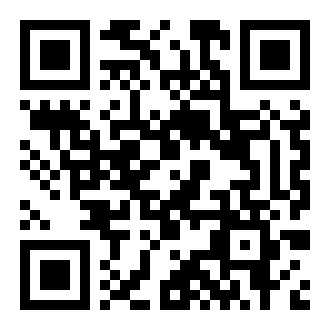
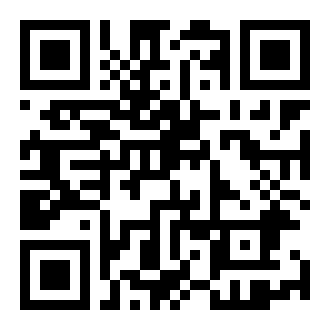
Cash App, Zelle, or Venmo — scan a code or tap a link:

I can't make my payment — what do I do?
Let us know before the late fee applies. We can arrange to split a payment over time, or move your due date if a different day of the month works better for you — just ask.
Why isn't my gate code working?
Three common reasons:
- Rent is past due and access has been locked out — call us to get caught up.
- You're entering or exiting outside gate hours — press the phone button on the keypad, or call the number on the gate, to be let out. As a last resort, call the Sheriff's Department.
- The code was entered incorrectly. Your code is 5 digits (it starts with a zero unless we've changed it for you) — press the key button after entering it. The * and # keys don't work and will just call the owner.
Can I change my gate code?
Yes — call, text, or email us with the new 5-digit code you'd like. Please allow an hour for it to take effect after we confirm the change. Don't write your code on your key tag.
Keys & lockouts
I lost my key — now what?
Call, text, or email us as soon as you notice. There's a $15 lost key fee; once it's paid, we'll text or email you which lockbox at the end of Building B your replacement key is in, along with the combination. Please retrieve it as soon as possible — in some cases we may need to drill out your old lock, which means opening your unit to do so.
I've been locked out — now what?
Call, text, or email us to make arrangements to get caught up — we can work with you on multiple payments over time if needed. The best policy is to reach out to us before it becomes a problem.
Moving out
How do I move out?
- Remove all belongings and trash — the unit should be completely empty.
- Close and lock the door.
- Place your key in the drop box at the end of Building B.
- Call, text, or email us to let us know you've moved out — failure to do so could result in additional rent being charged.
Failure to return your key will result in a lost key fee. After we inspect the unit, we'll close out your lease. Security deposits are non-refundable. We don't prorate rent for part of a month, but if you paid ahead and your rental ends early, the rent for the whole months remaining after you move out is refunded. If you move out within 10 days of your rent due date, you won't be charged for the following month. See our refund policy.